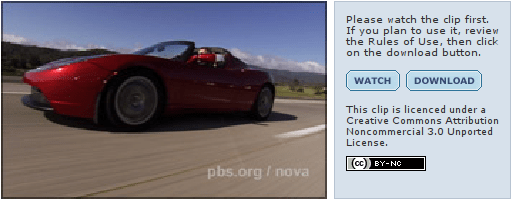
PBS gives away raw video footage for anyone to remix

You can download the raw footage for NOVA’s new documentary, released under a Creative Commons license that allows anyone to share or remix the footage, as long as it’s attributed and not for commercial purposes.

This experiment marks the first time we have ever made raw video available to the public, and we’re eager to see what you make from it. It’s because of viewers like you, as the saying goes, that we’re able to produce NOVA.
NOVA Tesla Roadster video screenshot

What if all public broadcasting material was released this way? Think of the great stuff people could create with Charlie Rose or Tavis Smiley footage, or the rest of the NOVA catalog. Or all those great NPR interviews?

It would cost money to maintain an archive, but not too much since online storage is getting very cheap, very quickly. This is doable, even on PBS’s budget.

If you’re not familiar with Creative Commons or question why you’d want to share your work, check out this fun primer featuring the White Stripes.

Scribd is important

Documents!

Remember documents? Way back, before broadband, before user-generated content, before video chat, we used computers to… well… play solitaire. But between games, we wrote documents. It was so, um… productive!

Well, documents are sexy again. Scribd is hot. It’s “YouTube for documents.” It’s got an API. Boing Boing likes it.

Its not just hot though, it’s also terribly useful. Upload most any type of document, and they’ll put it on the web. You can tag it, categorize it, and send out the links. You can embed the document in your web page like a YouTube video and they’ll deal with the all the technical mumbo jumbo.

But why is it important? Well, I’m pretty keen on the idea that you can post your skateboarding zine. Why would you still print a zine when you’ve got the web? It’s cool! Paper’s great! Not convinced? Well, you can post all your old zines too. The ones you made with a xerox copier. That’s awesome. Know what’s better?

They’ll scan them for you. For free.

But, wait! There’s more.

It’s especially useful to have a single place to look for a type of information. If I want a video of an ice skating dog, I’m not going to ask Yahoo, I’m going to ask YouTube. (Or maybe I’ll ask Google, ‘cuz they’re really clever and know where to look.) So, get this:

People are uploading their Freedom of Information Act results.

Before Scribd, if I had FOIAed documents I wanted to share with people, I needed to email them. Or put them on my web page, and email a link. And then try to make the page findable by search engines, so that people looking for information might find it. Now I can just upload them to Scribd, and they become instantly findable. (Especially when Google gets even cleverer and starts crawling, or buys, Scribd.)

We all must start doing this now. The next time you make a FOIA request, scan and upload the results. Upload your zine. Mail them your manuscript. Maybe you could… upload your newspaper?

Internet censorship, documented

A new book, Access Denied, The Practice and Policy of Global Internet Filtering examines the mechanisms, politics, and contexts of Internet censorship.

Access Denied cover

Jonathan Aronson, from the Annenberg School for Communication, makes the case:

The Web provides everybody with access to information. That makes those in power nervous. Transparency is the best defense against further narrowing of information access and the starting point for rolling back existing barriers. Access Denied provides the definitive analysis of government justifications for denying their own people access to some information and also documents global Internet filtering practices on a country-by-country basis. This is timely and important.

This is definitely on my to-read list. It wont matter how crazy delicious our newfangled, web-two-point-oh, citizen-journalizmatic blogonews projects are if folks can’t read ’em.

Found on BoingBoing – home of the definitive guide to defeating censorware.

Reader helps Methods Reporter get the scoop on Chicago earthquake

At 4:36 a.m., a magnitude 5.4 earthquake shook the Midwest.

At 4:53 a.m., the Methods Reporter, an independent Chicago news site, had a story up saying there was a earthquake. At that point, Chicago Public Radio was reporting that the Chicago Police Department was receiving calls, but they had little other information. Google news had nothing.

At 4:58 a.m., a reader named Ed posted a comment to the story with a link to a map describing the earthquake, it’s magnitude, and the epicentre. They promptly ran the image and Methods Reporter had more information about the quake than any other news source.

At 7:00 a.m., Google Adwords was charging $0.10 for “chicago earthquake,” according to Brad Flora, the publisher of the Methods Reporter. Soon after his ad appeared, Chicago Public Radio and EveryBlock ads started to show up as well, but neither were running a story, as of 7:10 a.m.

Update: At 7:37 a.m., Flora said that Adwords had brought in 23 clicks, costing him a total of about 4 dollars. His is a perfect example of how journalism can be done on a shoestring. Methods Reporter runs on WordPress, the same, excellent free and open source software that’s the platform for this and many other blogs and news sites.

Free, as in free speech

I use free and open source software, almost exclusively, when I practice journalism.

Free and open source software is counter-intuitive to many, but the mantra of the free software movement uses terms that journalists should understand very well.

Free software is a matter of liberty, not price. To understand the concept, you should think of free as in free speech, not as in free beer.

It’s a philosophy. It’s about transparency, openness and honesty. You are encouraged to know the inner workings of your tools, and make them better when you find them lacking. There are no secrets, no magic, and no mysterious blue screens of death.

The great thing is, it’s also free like “free beer.” Considering the financial mess this business is in, it should be clear that if journalism is to survive as a profession, it needs to cut costs. It needs to adopt free software.

*Off soap box.*

If you’re lucky, you work at an organization that already uses free and open source tools on the servers, but it’s unlikely that anyone you know uses them on the desktop. This is not because the tools are inferior. It’s because the geeks don’t have a marketing machine like Microsoft or Apple.

Here’s my very short list of free and open source software for journalists.

DesktopUbuntu Linux

Ubuntu is the first really good free operating system. The best way to go free is to start with a solid foundation. It’s secure, virus-free, and best of all, easy to use. Apple’s OS X is prettier, and to be honest, easier to use, but it’s not free, and you’ve got to own a Mac to use it. Ubuntu runs great on any computer, even one that’s getting a little elderly – unlike Windows Vista, an operating system so bloated that computers for sale today don’t run it well.

If you’re not ready to make the leap to Linux, every single one of the following applications will also work on Windows and OS X, so there’s no excuse to not try them out.

Writing, spreadsheets, etc.OpenOffice.org

OpenOffice.org is just like Microsoft Office, but free. It’s only drawback is that it doesn’t play nicely with Microsoft’s newest .docx, .xlsx, etc. file formats. But the older versions of Microsoft Word and Excel have the same problem, so you’ll be in the same boat as most Office users. It’s going to be a long time until those formats take hold, and by then OpenOffice.org will certainly have caught up.

OpenOffice.org on Ubuntu Linux

Image editingThe Gimp

Unless you’re a professional graphic artist, all the of the image manipulation you might do in Adobe Photoshop can be done in The Gimp. It’s a brilliant tool.

The Gimp on Ubuntu Linux

Web browsingMozilla Firefox

At this point, you’ve probably heard of Firefox. Maybe you’ve even switched away from Internet Explorer. If you haven’t, give it a shot. It’s more secure, more extensible, and more pleasant to use. On this one, you’re not making any compromises. It’s better, flat-out.

EmailMozilla Thunderbird

Maybe I’m old-school, but I still like having an email client on my desktop. If you’re like me and you don’t yet live in Gmail, Thunderbird is an excellent choice.

Sanity preservationSubversion

This one deserves its own article. Subversion is what keeps me from freaking out every time I have to pull my laptop out to go through airport security. Everything I write, all of my notes, resources, and photographs – Subversion enables me to easily copy them out to a secure server online. It does a lot more than that, but I love it most because it makes my computer disposable. If someone ganks my gear at the airport (or if I spill my coffee on it), I know my work is out there, ready to pull down to another machine.

For more on what Ubuntu can do for you, check out the docs at Ubuntu.com. If you dig it, you don’t need to install anything. You can boot up Ubuntu and give it a spin just by putting the disc in when you start your computer. So what’s stopping you? Try it out!

If you love it and are ready for more, check out Lifehacker’s Ubuntu coverage for gobs more fun.