Froot loops, search addicits, and augmented reality

Quote of the day goes to David Coen: “I wish I could just “command-F” for C.T.C (Cinnamon Toast Crunch).”

Amen! My pinky finger twitches for the “/” key (old-school Firefox shortcut) all the time: when I’m scanning ingredients, reading a news story, and finding my location on a map.

After a taste of what the web can do, I’m hooked. I need it all the time.

cereal aisle, by Ben McLeod

More from Señor Coen:

If you wanted to know what happened in the world you either turned on the TV or checked the headlines in your morning newspaper. Google has them beat. It’s too late to try and become the aisle sign (the first thing people go to). But there is still room to become the helpful employee roaming the aisle. That’s where news organizations can still make their mark.

So, paper is out, and journalists will become be the online guides. Boing Boing does this remarkably well. They post the stories that matter to me, and a whole lot of people like me. (Who knew copyleft, unicorns, and cryptozoology could command such an audience?)

But we’re still trapped in our computers

Find as you type makes the web livable. But off-screen search, now that would make reality livable. Epiphany, the just-barely-science-fiction augmented reality device from Vernor Vinge’s excellent book Rainbows End, gives the wearer queryable visual (and haptic) overlays of the real world:

If you override the defaults you can see in any direction you want. You can qualify default requests — like to make a query about something in an overlay. You can blend video from multiple viewpoints so you can ‘be’ where there is no physical viewpoint. That’s called ghosting. If you’re really slick, you can run simulations in real time and use the results as physical advice. That’s how the Radners do so well in baseball.

This is the sort of stuff journalists need to be geeked about. If we’re to be the sensemakers, as David’s post implies, we can’t let ourselves get stuck in the narrative tar pits.

We must create new ways to make sense of the world.

(I’ll happily host the first meeting of the sci-fi for journalists book club. Who’s bringing the chips?)
Thinking about data visualization for journalists

I posted the other day about data visualization tools, but even the best tools can’t save you if you’re clueless about visualization techniques. Most of this stuff isn’t web-specific, but I rant so frequently about this stuff to my classmates that I thought it’d be worthy of a post.

Charts!

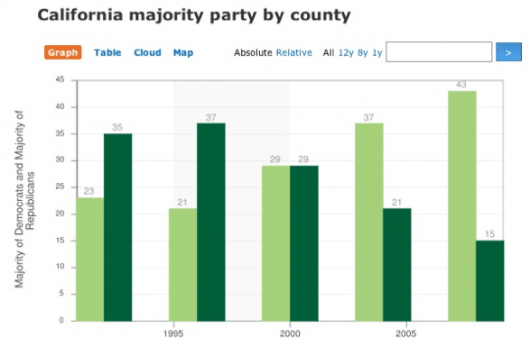
Flowing Data recently challenged their readers to improve this chart:

A bad chart

What was the graph trying to show? It was trying to show party registration in California over the past five presidential elections. Did it succeed? No. It failed miserably; however, you did much better. Here are all the reworks.

My favorite rework tells the story far better:

A good chart

More charts

The Gettysburg Powerpoint Presentation is absolutely priceless (quote from Norvig’s “making of” page):

I imagined what Abe Lincoln might have done if he had used PowerPoint rather than the power of oratory at Gettysburg. (I chose the Gettysburg speech because it was shorter than, say, the Martin Luther King “I have a dream” speech, and because I had an idea for turning “four score and seven years” into a gratuitous graph.)

Organizational overview from Gettysburg Address

Cartograms!

Le monde dans les yeux d’un rédac chef (The world in the eyes of an editor in chief) illustrates how news organizations cover the world disproportionately using one of my favorite visualization techniques, cartograms.

The cartograms below show the world through the eyes of editors-in-chief, in 2007. Countries swell as they receive more media attention; others shrink as we forget them.

Cartogram of the Economist\'s news coverage

Check out Worldmapper for lots more killer cartograms like this one:

Territory size shows the proportion of the world’s adherents to Islam living there.

Cartogram of national proportions of Muslims worldwide

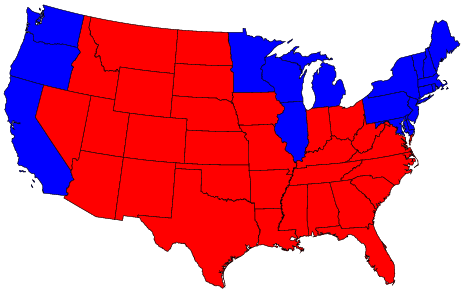
And no cartogram rant would be complete without the fantastic 2004 election race map:

The (contiguous 48) states of the country are colored red or blue to indicate whether a majority of their voters voted for the Republican candidate (George W. Bush) or the Democratic candidate (John F. Kerry) respectively. The map gives the superficial impression that the “red states” dominate the country, since they cover far more area than the blue ones.

Red and Blue states

In this map, it appears that only a rather small area is taken up by true red counties, the rest being mostly shades of purple with patches of blue in the urban areas.

Purple counties

Further reading

If you’re digging this, and you’re not yet familiar with Edward Tufte’s work… now’s when your mind gets blown. His books, including the classic The Visual Display of Quantitative Information, are absolutely brilliant. I took one of his courses several years ago — it was mind elevating.

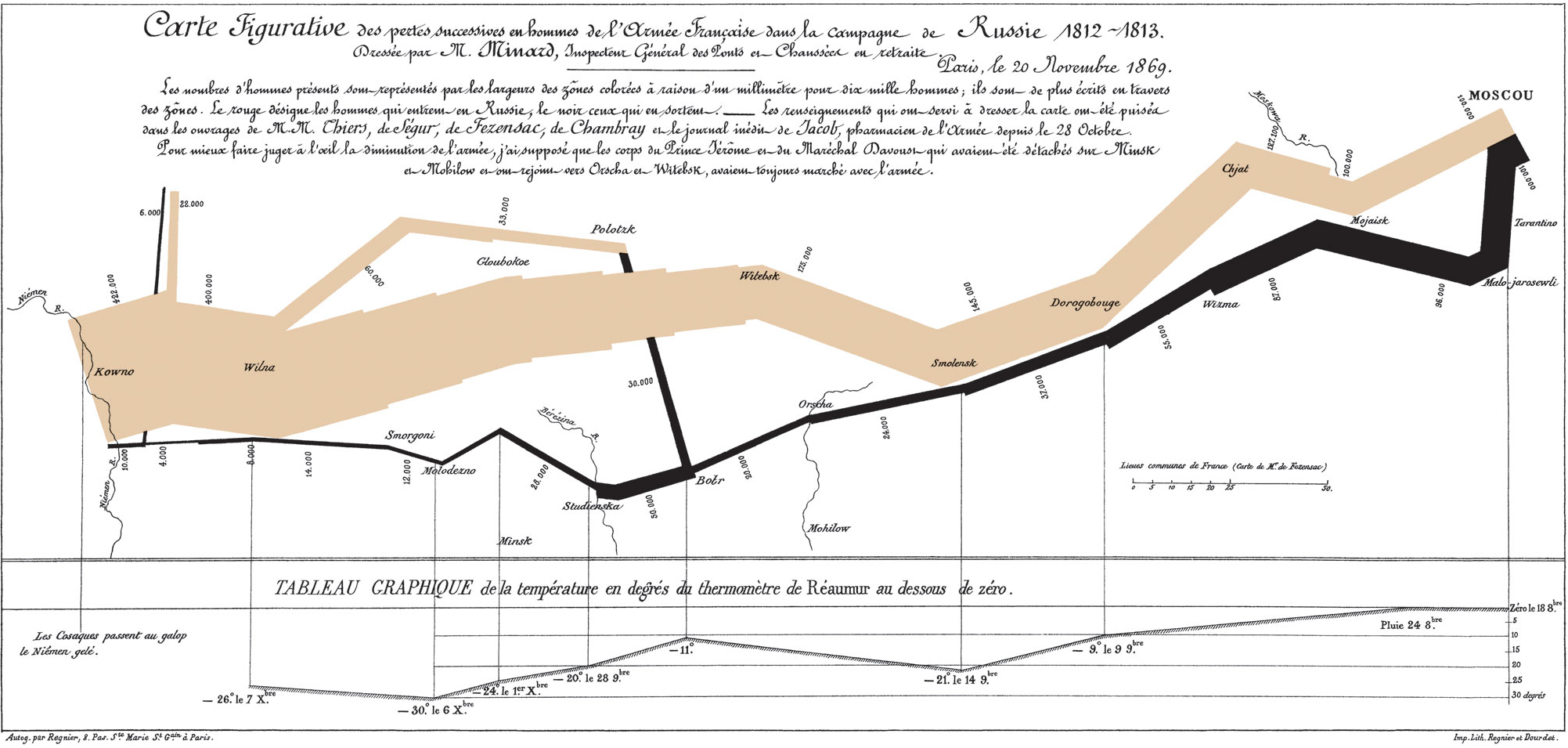
One example that Tufte uses has become, as far as I can tell, *the* visual representation of successful data visualization: Charles Minard’s graphic of Napoleon’s March. From the Wikipedia:

Charles Minard\'s graphic of Napoleon\'s March

The graph displays several variables in a single two-dimensional image:

  • the army’s location and direction, showing where units split off and rejoined
  • the declining size of the army (note e.g. the crossing of the Berezina river on the retreat)
  • the low temperatures during the retreat.

Brilliant.

Outbound links? EveryBlock? What the hell just happened at the Trib?

I just had an interesting chat with Daniel X. O’Neil, EveryBlock‘s People Person, and he confirmed my suspicions…

Two (maybe three) *totally amazing* things happened on chicagotribune.com today.

  1. They silently released a new “(beta test)” feature, an EveryBlock-enabled police blotterGaper’s Block got the scoop, from, get this, a tweet by the Tribune’s twitter persona, according to Daniel.
  2. More shockingly, the aforementioned blotter links *out* to EveryBlock, which links *out* to other news organizations. Click on one of the “more news in this neighborhood” links to see for yourself. I’m not positive, but I think this is a Tribune Company first!
  3. (maybe) They added a digg widget to their homepage? This may have happened earlier, but it’s the first time I’ve seen it.

Really Sexy Syndication: Page 3 girls read the feeds

Journalism.co.uk sez:

A Page 3 girl widget for RSS feeds, launched by The Sun on Friday, has beaten previous download figures for Sun apps after only three days, the newspaper has said.

The Keeley Hazell application was built using Adobe Air – a new piece of technology, which allows one widget to be built that will be compatible with both PC and MAC systems.

According to the Sun, here’s what you have to look forward to:

Desktop Keeley from the Sun

Dressed in a stunning range of lingerie, Keeley will be at your beck and call 24/7 and comes armed with all the information you need, whether it’s celeb’s drunken antics, the latest football transfer news or the Page 3 girl of the day.

Don’t try and tell me that this isn’t compelling. Christian Bale could sell a lot of bat-news. And I think, maybe, there could be a non-sexy way to do this too. Who best personifies your RSS feed?

I wonder if I can get Leoben to pose for the Sixth W…

7 great resources for green (and seasoned) new media journalists

TreeHouse Media Project, in their words: “Teaching old scribes new tricks.” Jay Rosen sez “The tone is self help for angry journalists.”

Making a living as a publisher, however, requires entrepreneurial skills that few journalists possess. That is the reason for the TreeHouse Media Project, an effort to provide journalists with the business knowledge and technical skills to survive — even thrive — in this harsh, yet exciting new media world.

Wired Journalists is social networking for, um, wired journalists. Be sure to check out the groups section for tons of good stuff:

WiredJournalists.com was created with self-motivated, eager-to-learn reporters, editors, executives, students and faculty in mind. Our goal is to help journalists who have few resources on hand other than their own desire to make a difference and help journalism grow into its new 21st Century role.

I\'m a member of: Wired Journalists

Reporters’ Cookbook is a wiki filled with good stuff:

For reporters to share code, examples, tutorials and other bits of information related to the practice of journalism, especially computer-assisted reporting.

Current.tv’s producer training is super cool — though I wish the content wasn’t buried in a icky Flash app! (Special thanks to Kevin for the suggestion!)

Current.tv

Online Journalism Review’s ‘How-To’ Guides are super useful (but don’t expect any more):

Getting started with an online news or information website? These guides will help you learn what you need to know about reporting, writing and making money on the Internet.

Ourmedia: Learning Center has got excellent guides on audio, video and multimedia:

The Learning Center is a rich educational resource for everything you wanted to know about user-created video, audio, and other forms of citizens’ media

J-learning has lots of great stuff (most of which is hidden under their colorful menu):

J-learning

Here, you’ll find extensive, detailed training in Web site creation, HTML, page design and use of photos, audio, video, animation, surveys and databases. We also offer tips on advertising, fundraising and e-commerce to help sustain these community efforts.

Where else would you send a new media newbie?